

Before connecting an Instagram reply tool, check how it gets access to your account. An official connection uses Meta’s login and permission steps. An API is the approved way software asks another service to do something, such as send a reply.
WinkSend’s Instagram DM automation uses Meta’s official API. You connect through the official login. You do not hand your Instagram password to WinkSend.
Check the connection before approving it
Use an Instagram Business or Creator account. When the login asks for access, read what the tool needs and confirm you are connecting the right account.
Look for these things:
- The login belongs to Instagram or Meta.
- The connected account is the one you want to use.
- The requested access fits the features you plan to use.
- You know where to remove access later.
Do not paste passwords, access tokens, or browser session data into support messages. Those details can give someone access to your account.
Official access still has limits
An official connection does not allow a tool to send anything to anyone. Instagram decides which actions and messages are allowed. A comment reply, Story interaction, and follow-up can have different rules.
The examples on this site cover replies to supported comments and messages. They do not promise bulk cold DMs or a way to bypass restrictions.
Check Meta’s Instagram messaging documentation and its private-reply guidance for the reply type you need. Do not assume one time limit covers every type of message.
A paid plan does not remove platform rules
A tool’s monthly allowance and Meta’s sending rules are different limits. A paid plan can provide more runs within the tool. It cannot override Meta’s rules.
AI credits can also have their own limit. Check WinkSend pricing for runs, active rules, and credits rather than treating them as the same thing.
Using an official API does not guarantee an account will never be restricted. The message content, recipient interaction, account access, and platform rules still matter.
Review and remove access
If you stop using a tool, review the connection in the tool and in your Meta account settings. Remove access you no longer need. A disconnected account cannot keep sending through that connection.
In WinkSend, open Channels → Instagram. Disable pauses the channel. Remove permanently removes the account and its automation history from the workspace. Read the warning before choosing it.
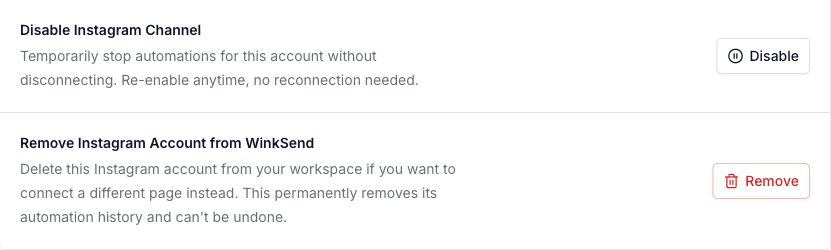
WinkSend’s data deletion instructions explain how to disconnect Instagram and request deletion of your account data. Disconnecting an integration and deleting stored data are different actions. Check both if you are leaving a service.
If a reply stops working
Check the account connection, requested permissions, active reply rule, and remaining monthly runs. Read any delivery failure shown in the tool. Then test with a separate account.
The Instagram connection screen has Refresh Permissions for access problems. Use the official login steps it opens; keep your password inside Meta’s login page.

The comment automation troubleshooting guide gives a simple checklist. If you need help, contact support with the post link and test time. Keep passwords and private tokens out of the message.
This guide explains connection choices and checks. It is not a security audit of every tool or a guarantee against account restrictions.